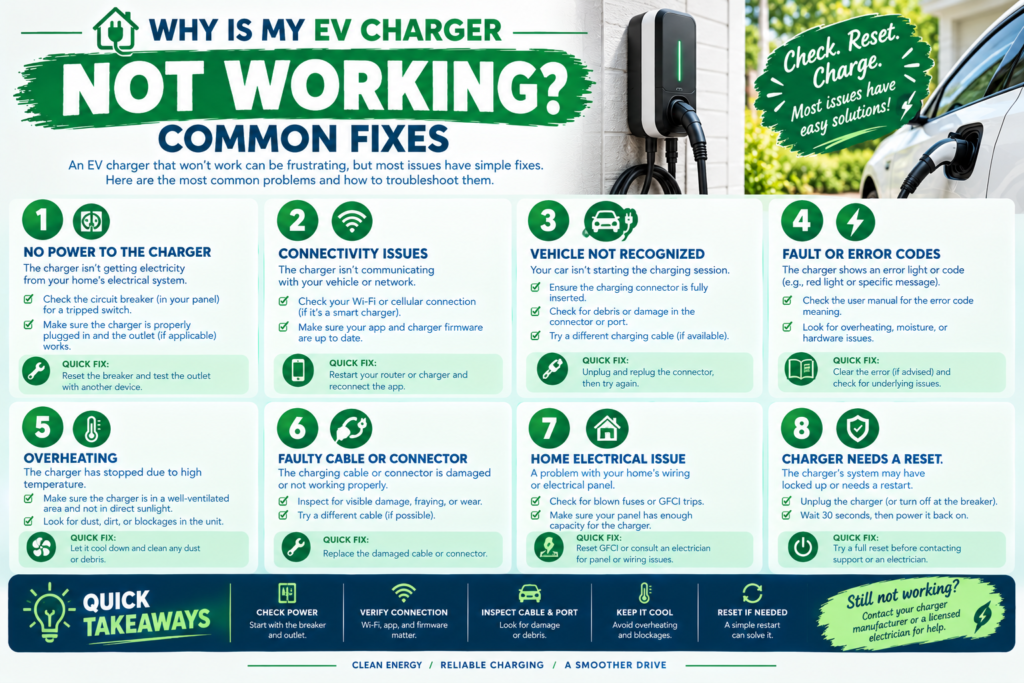
A home EV charger that suddenly stops working is frustrating, but the cause is often something simple you can check yourself before assuming it’s a hardware failure. Here’s a practical troubleshooting checklist, from the most common and easiest fixes to the issues that genuinely need an electrician.
Quick Answer
Most “not working” issues come down to a tripped breaker, a WiFi connectivity problem (on smart chargers), a loose connector, or the vehicle itself pausing the session for a scheduling or battery-management reason rather than a charger malfunction. Work through the checklist below in order — the most common causes are listed first.
Start Here: Basic Checks
1. Check the Circuit Breaker
A tripped breaker is one of the most common reasons a charger appears completely dead. Check your electrical panel for a breaker in the “off” or “tripped” (middle) position and reset it fully off, then back on. If it trips again immediately after charging starts, don’t keep resetting it repeatedly — this can indicate a real electrical issue and warrants an electrician, covered further below.
2. Confirm the Charger Has Power
Look for any indicator light on the charger itself. No light at all, even after confirming the breaker is on, can point to a power delivery issue between the panel and the charger.
3. Check the Connector Is Fully Seated
A connector that isn’t fully plugged into the vehicle’s charging port won’t initiate charging, even if it looks close. Unplug and firmly reconnect, listening or feeling for it to click or lock into place as designed.
4. Check Your Vehicle’s Charging Settings
Many EVs have their own charge scheduling, charge limit, or “departure time” settings that can pause or delay charging independently of the charger itself. Check your car’s own settings and app before assuming the charger is at fault — this is an especially common cause that has nothing to do with the charger hardware.
Smart Charger (WiFi/App) Specific Issues
5. Check WiFi Connectivity
If your charger’s app shows it as offline, check your home WiFi network first — router restarts, ISP outages, or a charger too far from your router can all cause this. Most chargers will continue to function for basic charging even when offline, but scheduling and remote features won’t work until connectivity is restored.
6. Restart the Charger
Many connectivity or software glitches resolve with a simple restart — check your specific charger’s manual for the correct restart procedure, since some models have a dedicated reset button while others require briefly cutting power at the breaker.
7. Update Firmware
An outdated firmware version can sometimes cause erratic behavior that a firmware update resolves. Check your charger’s app for available updates if you haven’t checked recently.
Less Common but Still DIY-Checkable
8. Check for a GFCI Trip (Outdoor or GFCI-Protected Installations)
If your charger’s circuit includes GFCI protection, check for a tripped GFCI outlet or breaker separately from your main panel — these have their own reset button and can trip independently of the main breaker, particularly after moisture exposure.
9. Check for Extreme Temperature Shutdown
Many chargers have built-in thermal protection that can pause charging in extreme heat or cold to protect the internal electronics and your vehicle’s battery. If you’re troubleshooting during an unusually hot or cold spell, this could be a temporary, self-resolving cause rather than a fault.
When It’s Time to Call an Electrician
Stop troubleshooting yourself and call a licensed electrician if you notice:
- A breaker that trips repeatedly every time you try to charge, even after a full reset
- Visible damage to the cable, connector, outlet, or charger housing
- Unusual heat, buzzing, sparking, or a burning smell from the charger, outlet, or panel — stop using the charger immediately if this occurs
- Persistent error codes that don’t resolve after a restart, firmware update, and basic checks
- The issue started after a storm, flooding, or other event that could have affected your home’s electrical system
See our guide on how to maintain your home EV charger for ongoing care that helps prevent many of these issues before they start.
A Simple Troubleshooting Order
- Check the breaker
- Check the charger’s power indicator light
- Reseat the connector
- Check your vehicle’s own charging settings and schedule
- Check WiFi connectivity (smart chargers)
- Restart the charger
- Check for firmware updates
- Check for a tripped GFCI
- Consider whether extreme temperature could be a factor
- If none of the above resolves it, call a licensed electrician
Worked Example: Is the Amp Setting Tripping Your Breaker?
A frequent cause of a charger that stops mid-session is an amp setting that is too high for the breaker. The charger may draw at most 80% of the breaker rating continuously:
| Breaker | Max safe charger setting | Setting found | Result |
|---|---|---|---|
| 40 A | 32 A | 32 A | OK |
| 40 A | 32 A | 40 A | Overloaded (125% of the limit) — set to 32 A |
| 50 A | 40 A | 48 A | Overloaded (120%) — set to 40 A |
| 60 A | 48 A | 48 A | OK |
Example: a charger configured for 48 A on a 50 A breaker asks for 48 ÷ 40 = 120% of what the circuit may carry continuously. Lowering the setting to 40 A in the app (or by the DIP switch, per the manual) fixes the mismatch. If a correctly set charger still trips, stop using it and call a licensed electrician.
Figures in this example are illustrative and rounded; your rates, vehicle and installation will differ.
Sources and Further Reading
- U.S. DOE Alternative Fuels Data Center — Charging Plug-In Electric Vehicles at Home
- NFPA 70, National Electrical Code (Article 625 covers EV charging equipment)
- U.S. Consumer Product Safety Commission — Electrical Safety
Last reviewed: October 2026.
Key Takeaways
- The most common causes of a non-working charger are a tripped breaker, a vehicle-side scheduling setting, or a loose connector — not a hardware failure.
- Smart charger issues are often WiFi connectivity or firmware related, and typically don’t affect basic charging function even when the app shows the unit offline.
- Repeated breaker trips, visible damage, unusual heat/smell, or persistent unresolved error codes are signs to call an electrician rather than continue troubleshooting yourself.
- Working through checks in order — from simplest to most involved — resolves the vast majority of “charger not working” situations without a service call.
Frequently Asked Questions
My charger’s app shows an error, but my car is still charging — what should I do? If your vehicle is actually charging normally, the app error may be a connectivity or software display issue rather than an actual charging problem. Try restarting the charger’s app or checking for a firmware update, but there’s no urgency if charging itself is working.
Is it normal for my charger to pause and restart charging on its own? This is often intentional — many smart chargers and vehicles use scheduling or demand-response features that pause and resume charging automatically to align with off-peak electricity rates or grid conditions, rather than indicating malfunction.
How do I know if the problem is my charger or my car? Try using the charger with a different EV if possible (or borrowing a friend’s compatible vehicle), or try charging your car with a different charger or standard outlet. This can help isolate whether the issue follows the charger or the vehicle.